Any plans to use Github Copilot (NOW AVAILABLE)

I know you support GPT Turbo 3.5, but many times (surprisingly I know) I get better results using Github Copilot. Any reason you've decided not to support it?
Comments
-
LINQPad also supports the latest GPT models including gpt-4o. Go to AI Settings and select a newer model from the combo - this should improve the results.
-
I think the built-in AI feature in LINQPad 8 is quite amazing. I use it very often, paired with GPT-4o, the effect is very good!
-
I use it with 4o-mini and it works great and it's a bit cheaper too. 4o is supposed to be better though.
-
could this be added to linqpad?
https://github.blog/changelog/2025-02-10-copilot-language-server-sdk-is-now-available/ -
I've got a Github Copilot subscription through my work, would be awesome if I could utilize it here. Everywhere I've seen references to adding copilot to some application, they use openapi terms. Maybe I'm just confused on how to configure it. Is Copilot supported?
-
Copilot is not supported at this stage. I'll be reviewing this in the coming months. Are you not getting good results with GPT-4.1?
-
TBH, I haven't looked into getting a subscription for myself personally, with any of the LLMs. Copilot is the closest I've got and was hoping it would be usable.
-
Getting an OpenAI account is easy. There's no monthly subscription - it's automatic prepaid top-up based on use, which ends up being very cheap.
LINQPad also supports OpenRouter (see Help | What's New for details). This lets you select any model, so you can switch to Sonnet or Gemini, for instance, without creating a new account.
-
I already pay for github copilot in VS. Would be fine if I could use this service in LP without having to pay a second time for an equivalent service
-
You're looking at maybe a few dollars a month in usage fees - or much less still with Grok Code Fast 1. The latter charges $1 for 5 million input tokens, and is the most popular programming model right now on OpenRouter. Is that really a deal-breaker?
-
I hear your arguments. I'll try.
Anyway, I already bought linqpad 9. So the deal is done betwen you and me -
+1 to supporting the various models through GitHub Copilot.
OpenCode.ai has a similar feature where it can use the various models through your Copilot subscription.
No, it's a dealbreaker to keep a few dollars in API credits handy but also would be handy to keep things primarily in one subscription.
-
In my case, my company only allows the use of Copilot because of privacy concerns. They pay it for all of us to use in Visual Studio & VSCode (and I can also use it in DBeaver as it supports it) All other AI sites and platforms are blocked.
-
A feature request has been registered for this that you can vote on here:
-
The latest beta (9.7.8) has Copilot integration.
You can use most of the latest models, including Sonnet 4.6, Opus 4.6 and GPT 5.4 for the AI agent and chat, and GPT 4.1 for completion.
Please give this a through test and let me know how you get along!
-
Hi Joe. I tried to hook up Linqpad to Github Copilot this morning.
I got this error:
An error occurred processing the request.
You are not authorized to use this Copilot feature, it requires an enterprise or organization policy to be enabled.
During the signin process, after having clicked thru and associated with my Github account, I got a similar message in an IOException box which I submitted. I don't have extra information as to what information it's asking Github Copilot for.
Likely this is some weird setting in Github I have to go tell the 'powers that be' we need to turn on to fix this, but without more information, I can't tell what setting that is.
Thanks for getting this out though, this is a huge boon to my org who primarily uses GHCP and has all the other AI tools blocked (sigh).
-
Thanks Joe! Looks like it's working for me. 🎉
-
@CraigVenz - from what I understand, Enterprise GitHub accounts require the admin to enable the Copilot Extensions policy in order for Copilot to work outside VS Code / Visual Studio.
-
Works nicely here too. Thank you.
Some feedback:
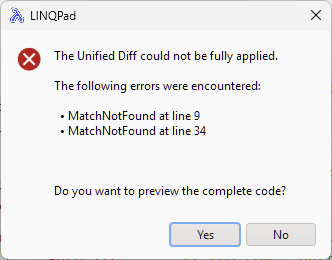
- I seem to be hitting the MatchNotFound error usually on the second update. Got that quite a few times today, but not sure if that's Copilot or the model:
I like seeing the Thinking coming out (I think that's not Copilot specific?). I notice that thinking is collapsed to a "Show Thinking" link at the end. I could see a way to toggle re-collapse the text once it's been expanded.
The "Why this works" that's ouput from the model after the solution is nice but it slightly increases the noise for where I need to look to apply changes. A minor issue but something I noticed.
Would be great to have a pointer cursor over the controls - also super minor obviously.

Anyway, thank you for the extra choice - works great!
-
What model are you using? You should rarely get that error with Sonnet; let me know if it persists. Note that patching is more reliable from the inline agent than from chat, because the agent interacts directly with the editor and automatically goes back to the model if the diff was bad.
Regarding "Why this works", are you referring to the chat window or the inline agent? If you mean chat, this will be generated by the model. If you don't want it, add something to the system prompt to say that you just want code and not an explanation.
I'll fix the cursor issue in the next build.
-
Thanks for your reply. I'm using the Copilot - Claude Sonnet 4.6. The above was based on 9.7.8 by the way.
Today (in 9.7.9) I can't get the MatchNotFound to reproduce at all. If it comes back I'll follow up.
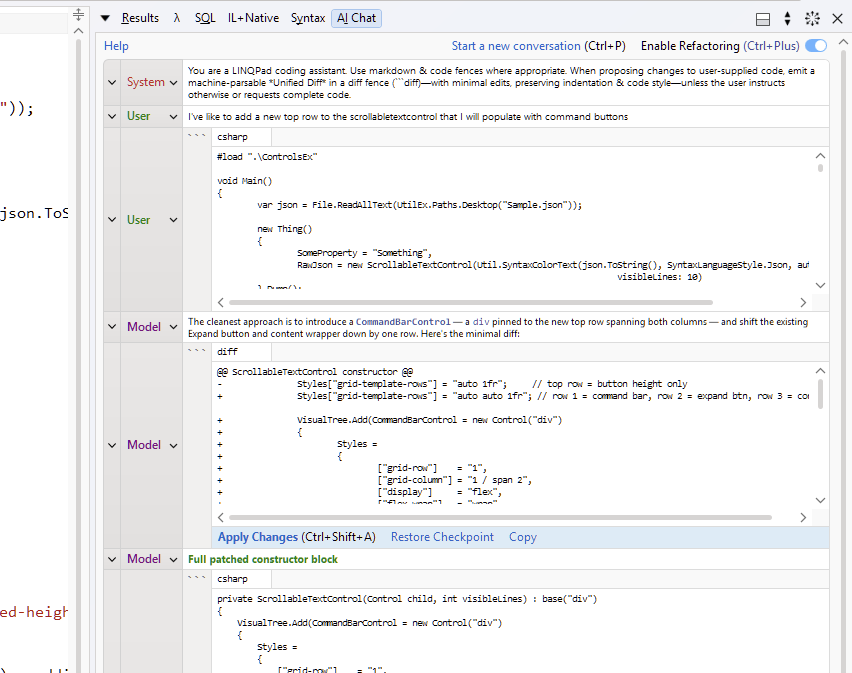
Re "Why this works", yes, I am talking about chat. I think in VS Code and Visual Studio chat the rationale / explanation part feels easier to identify. Today, I got slightly different output, but a similar issue in terms of seeing which one to 'apply' (see attached screenshot). I generally do like to see the explanation, but if I could highlight the diff to apply in some way, I'd put my hand up for that.
Would something like this work?
-
Yes, I can add that highlight.
btw, is there any reason that you don't use the smart agent for this? (Ctrl+I). It will apply undoable red/green diffs directly and display a concise explanation in a bubble right above where it applies the first change. Also, the agent has access to a RAG (and your data context if you choose), which can significantly improve the response.
-
Oh ok, I thought the manual chat with Enable refactoring was agentic - is that right?
I have generally gravitated towards the manual chat as a) I thought the integration was the same and b) I like seeing everything and being able to come back to the conversation. With Ctrl+I I feel like I'm loosing all the earlier conversation - ie it's a new session each time - have I misunderstood?
Re the 'data context if you choose' is there somewhere else I can add this...like copilot-instructions.md or skill? I think you can set copilot--instructions.md at user level - does LINQPad pick that up and is there anywhere else in the Queries hierarchy that I place this sort of thing?
-
After the agent responds, click Continue conversation if you want to preserve the thread. This will create a chat that includes the question & answer, along with the info gained from the RAG (and your data context if you chose to include it). Manual chat is WYSIWYG - you see everything sent and received from the model. The Enable Refactoring toggle just adds an instruction to the system prompt to request unified diffs. This is totally transparent - you can see the system prompt change when you use this toggle.
To include data context schema, turn on the Include Connection Schema toggle in the smart agent. LINQPad will then allow the model to figure out which tables/views (if any) are relevant to your question and then give the model an efficiently formatted schema that includes just those objects (along with tips on how to use it and traps to avoid). The schema is provided in either in C# or SQL, depending on what language you have selected.
If you were to put a data context schema into a global copilot-instructions file, you'd run into (at least) three problems (1) You'd have to manually create it - and update it each time you changed connections (2) larger schemas would fill the context window and (3) SQL queries need a differently formatted data context than .NET queries.
-
Thank you. I hadn't spotted the Continue conversation. That's helpful. It would be great to be able to persist the button so that I could resurect that chat on the next Ctrl+I. I find I'm drawn to deal with the accept reject first and then on to think about how to proceed.
I now also see the "# Sample Content" context. I misread your 'data context if you choose' to mean more general chat session context.
Seeing the sample content user prompt also makes me wish for the possibility of file references so that I could bring in additional file references in a similar way to copilot-instructions.md. I agree this wouldn't be good for data context but for other scenarios being able to write something like
#instructions.mdwhich would be some relative path in My Queries would be great. -
Just a weird anomaly to report.
I have 2 Github accounts. One I use for personal things, one I have associated with my corporation. My personal github doesn't have copilot because I'm not going to pay for it.
When I am logged in to Github on my personal account and I open Linqpad AI settings and try to add an AI provider as Copilot Beta, it will look at my authentication status (from the gh command line tool it appears) and show me a message stating I don't have the feature on my account. Cool.That's what I'd expect.
The thing I just noticed, though, is that the 'Sign in as a different account' button doesn't seem to do anything. I click that, and it just shows the same error message that I don't have copilot on my account. No redirect or box or anything to actually let me sign in as a different account.
I had to quit Linqpad entirely, open command prompt,
gh auth logout,gh auth loginagain, and then restart Linqpad. Then it works as you expect.So, looks like the sign in as different account thing needs more iteration.
Just FYI.
-
Thanks - I've found what's causing this and will have a fix ready soon.
-
The 9.8.5 beta now has a fully agentic mode in Chat, with direct access to the current script, and also to LINQPad's native tools. So now Chat can do everything that the inline agent can do - and more. Let me know how it works for you.
-
@CraigVenz - this should now be fixed in 9.8.5 - if not, let me know.
-
@JoeAlbahari Yes that's perfect. I didn't spot the Copilot distinction for 'Full Agent' at first, but the 'Help' link helped. Thank you. Super slick!


