Error trying to set up AI on LinqPad 9

Been using AI in LP8 for a while with my OpenAI API key. I just upgraded to LP9, and want to get AI working there.
Not sure if I'm doing this right, as LP9's options for AI are a lot more complex.
I went to the AI section of settings, and clicked the "Add AI provider" button.
As I'm using OpenAI, I clicked the "OpenAI" button, entered by API key and clicked Test, but got a message...
An error occured processing the request.
The OpenAI API returned HTTP error code BadRequest
Your organization must be verified to use the model 'gpt-5.1'. Please go to: https://platform.openai.com/settings/organization/general and click on Verify Organization. If you just verified, it can take up to 15 minutes for access to propagate.
TIP: Organization verification requires uploading ID. You can avoid this by using OpenRouter. OpenRouter gives you access to all popular models - including GPT 5 Reasoning - without needing to upload ID.
LINQPad fully supports OpenRouter - go to Settings (F6) to configure.
I closed that, and back in settings, clicked the "Add AI provider" button again, and this time chose OpenRouter. I entered my API key in the "API key" box and clicked test, but I got a message...
An error occured processing the request.
The OpenRouter API returned HTTP error code Unauthorized
No cookie auth credentials found
Am I doing something wrong?
Thanks
P.S. The second message contains a spelling mistake by the way, it should be "occurred", not "occured" 😁
Answers
-
Can I ask what country you are in? You shouldn't need to be verified to use model gpt-5.1. OpenAI changed this some time ago - verification is required only to see reasoning tokens. As a fallback, though, you can use GPT 5 Chat.
When you set up OpenRouter, did you click Sign Up and Generate Key? It should populate the API automatically when you do this.
-
Hi Joe, thanks for the reply.
I'm in the UK.
I didn't sign up with OpenRouter (duh, obvious now you point it out!), which is probably why it didn't work! I just signed up, but it looks like I need to buy credits to use it. As I already have credit with OpenAI, I don't really want to have to pay someone else as well.
Any further help appreciated. Thanks again
-
It looks like OpenAI have blocked you from using the latest models (almost certainly without good reason). I find this infuriating, because there's no transparency to their policies. I cannot design LINQPad to work around their policies when (a) they do not publish them, and (b) they apply them differently to different people. And it's not even the case that OpenAI have the best models. The best coding models come from Anthropic.
From here, you have a couple of options. The first is to upload ID - to do this, click the "Verify Identity" link in LINQPad's OpenAI provider dialog. This should remove the block.
The second option is to click the "Configure" link in LINQPad's AI Setup for OpenAI and check the GPT 5 Chat model. Hopefully that slightly older model should work without ID. If you uncheck the newer ones, it will remove them from the dropdown list, so you won't accidentally select them.
This should get LINQPad working again with OpenAI. From there, can I suggest that you also add a small amount of credit on OpenRouter, so you can get to experience what a really good reasoning model (Sonnet/Opus) can do. You can still use your OpenAI account at the same time in LINQPad - it will display two dropdowns in the chat window and coding agent window, so you can pick a model from either provider.
-
If you're able to let me know ASAP whether the GPT 5 Chat model works for you, I can roll out an update for everyone that makes this the default for everyone using OpenAI.
And if you could also try adding a model with the following ID and letting me know whether it works, that would be great:
gpt-5.2-chat-latest
Also please tell me if GPT 5 Mini works when you click the Test button. We may have to go back to 4.1-mini.
-
Hello again, thanks for the reply.
Verifying my identity looks like quite an obtrusive business, so I decided to try the other option first.
I went to the Open AI settings, unchecked the two selected models, then checked GPT 5 Chat and clicked the Test button. After a moment, this came up with the same (I think) error as before...
An error occured processing the request.
The OpenAI API returned HTTP error code BadRequest
Your organization must be verified to use the model 'gpt-5.1'. Please go to: https://platform.openai.com/settings/organization/general and click on Verify Organization. If you just verified, it can take up to 15 minutes for access to propagate.TIP: Organization verification requires uploading ID. You can avoid this by using OpenRouter. OpenRouter gives you access to all popular models - including GPT 5 Reasoning - without needing to upload ID.
LINQPad fully supports OpenRouter - go to Settings (F6) to configure.
Note that the error message refers to 5.1, which I had deselected.
I clicked OK, and reopened the dialog, and noticed that it had ignored my changes, and reverted to the original selection. Please see the screenshot below...
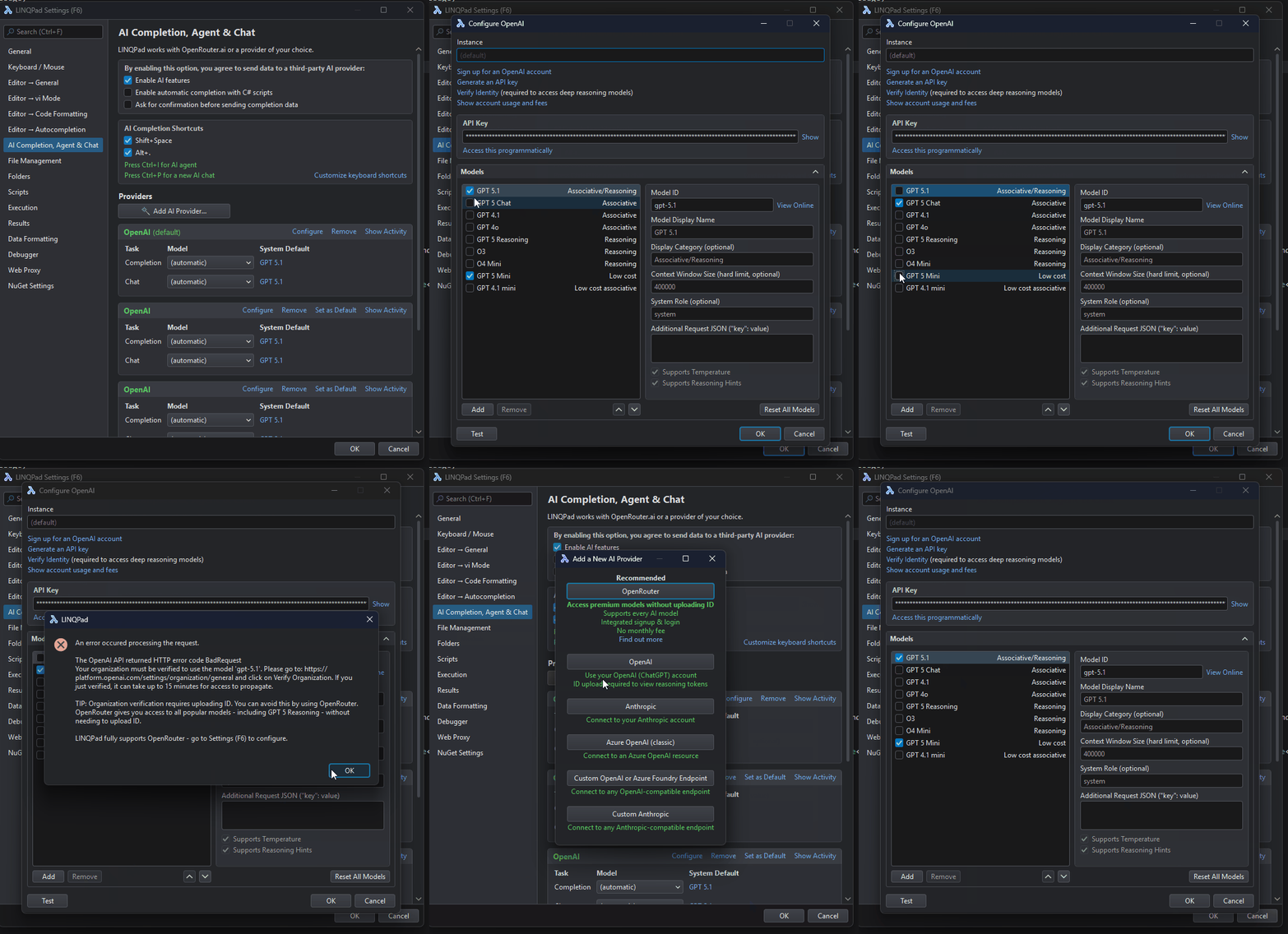
Not sure if this is a bug in LP, but as you can see, I am unable to test as requested.
Thanks again
-
It occurred to me that my PC uses an Internet filter, and wondered if that was the problem. I connected my lap top to an unfiltered connection and tried the same thing. It didn't work, but the problem was different.
I entered my OpenAI API key and clicked the Test button, and got an exception...
The filename, directory name, or volume label syntax is incorrect. : 'C:\Users\AY Silver\AppData\Local\LINQPad\Passwords\2E61693A6170696B65792E6F70656E...' (364 characters long).
Looking in C:\Users\AY Silver\AppData\Local\LINQPad\Passwords, I can see two files, 2E61693A6170696B65792E6F70656E6169 (which is the same as the start of the missing file above) and 6F70656E61692E6170696B6579.
Don't know if that helps or confuses!
-
Hmm, I just tried again, so I could record it for your viewing pleasure 😁, and I now get exactly the same issue as on my main PC. It's clearly nothing to do with my filter, and is the same on two machines.
No idea what happened with the error I reported a minute ago. Hope I'm not confusing you!
Thanks again for any help.
-
Did you paste your API key into the Instance text box, perhaps?
Regarding the "Test" button, it tests the selected model, not all checked models in sequence. You must move the cursor to the model you want to test before clicking Test.
-
No, as you can see from the screenshot, the Instance box is empty, and the API Key box is full of stars, which is my API key.
Didn't realise about Test. When I select GPT-5 Chat and click Test, it works fine.
So it looks like I can use this model, but not 5.1. Any further thoughts? Thanks again
-
So, it looks like they're blocking you from the professional models, but not the consumer models.
With the latest beta update, I've added GPT 5.2 Chat to the list of preconfigured models. You will just need to make this the default using the dropdown in LINQPad's settings.
-
Thanks very much for all your help
