Can the height of new TabControl to set to use the whole of the output window?

TLDR
Trying out the new TabControl (available in the latest beta) and I was wondering if it is possible to set the content height so that it uses the rest of the output panel, even if the output panel is re-sized or if the editor is hidden.
Longer version :
I seem to spend a lot of time scrolling up and down my results windows especially when I am trying to compare the output of different dumps.
My previous solution was to use several panels to display different information which allows me to switch between panels easily. This was originally using a modified version of the code from https://forum.linqpad.net/discussion/comment/2463.
With the latest beta this has become much easier.
But panels have a major flaw in that links do not work. So MaxDepth links can not be expanded and other links using Util.OnDemand do not work.
(CollapseTo can be used in place of MaxDepth, but this does not look as neat and also limits the amount of information that can be dumped)
With the latest beta, I was trying out the new TabControl and this displays in the normal Output section and hence links work correctly.
https://share.linqpad.net/p6ki437c.linq is a script to demonstrate using the panel and using the tabcontrol.
I have hacked the tabcontrol to hardcode the content height to be 420px so that it fits on my screen when the editor is shown, but obviously this is the wrong size if I hide the editor and may not look right if your screen size is different from mine. So I was wondering if there was a way to do this properly?
PS I have also set overflow-x to auto so that it looks better if the content is wider that the current screen (although the script does not demo that).
PPS I'm aware my hacked version has a weird visual glitch from bleed-through when scrolling down - see 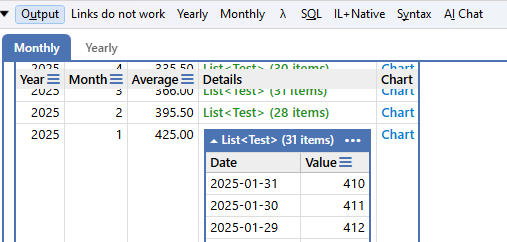
Comments
-
Set the height of the control to be proportional to the viewport height using the
vhunits.100vhis a little too big to me, but90vhlooks good. Then make the content area fill that space. Optionally set a minimum height.var tabControl = new TabControl( ("Monthly", new DumpContainer(monthly, options => { options.MaxDepth = 1; options.NoTotals = true; })), ("Yearly", new DumpContainer(yearly, options => { options.MaxDepth = 1; options.NoTotals = true; })) ).Dump(); tabControl.Styles["height"] = "90vh"; // ~90% of the visible area tabControl.Styles["min-height"] = "420px"; // set minimum height for the overall content Div contentArea = tabControl.Uncapsulate()._contentArea; contentArea.Styles["overflow-x"] = "auto"; contentArea.Styles["height"] = "100%"; // fill remaining spaceIf you want more control over how it's rendered, you'd want to create some CSS rules that uses media queries to set the values based on the available space.
-
This looks a lot better.
Thanks -
In 9.7.9, I've added a new FillRemainingHeight method to the TabControl to make this easier:
var culture = CultureInfo.CurrentCulture; var tc = new TabControl ( ("Calendar", new DumpContainer (culture.Calendar)), ("TextInfo", new DumpContainer (culture.TextInfo)), ("NumberFormat", new DumpContainer (culture.NumberFormat, options => options.CollapseTo = 1)), ("Notes", new TextArea()) ) .FillRemainingHeight() .Dump(); -
Brilliant . Works perfectly.
Thank you so much -
@JoeAlbahari said:
In 9.7.9, I've added a new FillRemainingHeight method to the TabControl to make this easier:var culture = CultureInfo.CurrentCulture; var tc = new TabControl ( ("Calendar", new DumpContainer (culture.Calendar)), ("TextInfo", new DumpContainer (culture.TextInfo)), ("NumberFormat", new DumpContainer (culture.NumberFormat, options => options.CollapseTo = 1)), ("Notes", new TextArea()) ) .FillRemainingHeight() .Dump();Bug: Resize
TextAreaat Notes tab and start typing. It shrinks back. -
Yes: manual resizing should override
AutoHeight. I'll include some JS to fix this. -
This is now fixed in 9.7.10. I've also improved the layout model when
FillRemainingHeight()is in force to allow percentage-based sizing on children, so you can now do this:var tc = new TabControl ( ("Notes", new TextArea { Height = "100%", Width = "100%" }) ) .FillRemainingHeight() .Dump();


