Set results window default size and position

Hi,
Is there a way to control the monitor and position of the results window when undocked?

I have two monitors and usually have LINQPad(5/7) snapped to the right-hand half of the right-hand monitor. When undocking, I almost always want the window to fill the left-hand half of the the same right-hand monitor, and so I end up manually resizing and moving the window from the default left-hand monitor every time.
My ideal would be to be able to position the results window and then have a button available in that window to set the current size and position as the default for that monitor setup. (ie there might be different configs for 1,2,3... monitors).
For the cherry on top, being able to set this at both app and query (override) levels would be helpful too as I have many queries that work in conjunction with other open apps.
Is anything to set the default position currently? I don't think so but I thought I'd check / register interest.
Best regards
John
Comments
-
Perhaps you should look into DisplayFusion?
-
Hi, Sorry. Just realised I missed this message and thank you for the tip - will give it try.
-
Thanks again for the DisplayFusion tip - I took the plunge on Cyber Monday. I now have this trigger working nicely with LINQPad 5 as follows:
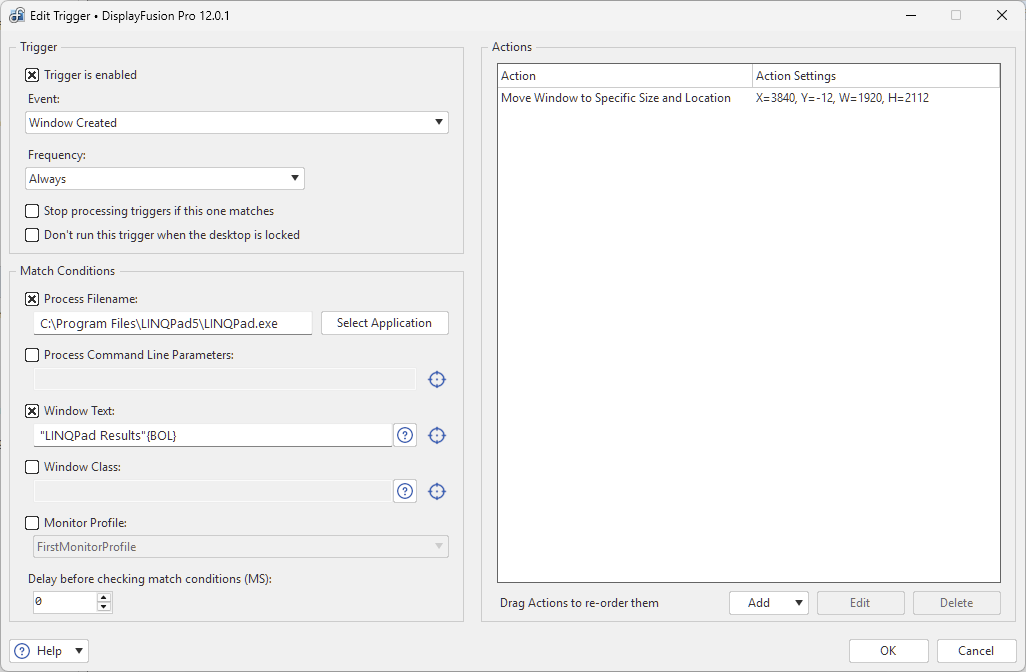
I don't think they currently support 'or' pipe syntax for the process filename, so I duplicated for LINQPad 9 (with a different path: C:\Program Files\LINQPad9\LINQPad9.exe), but there must be something I'm missing as 9 doesn't seem to respond to the trigger.
The 'BOL' syntax, for anyone reading, is 'beginning of line'. There's more syntax defined here: https://www.displayfusion.com/Faq/TextQuerySyntax/
I'll update here if I discover the issue.
-
Are you using the beta releases or stable? You might need to attach to
LINQPad9-x64.exeas well asLINQPad9.exe. -
Hello Jeff, Yes I'm on stable (9.5.10). I tried with x64 but that didn't fix I'm afraid. I think the path is right and can confirm this with Process Explorer + I can trigger a notification when LINQPad 9 opens so I'm assuming the process filename condition is right. The problem seems to be that the window text condition doesn't get hit.
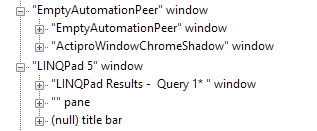
I see, using Inspect.exe, that LINQPad 9 doesn't expose the caption in the same way as 5 but I'm not clear if that's just what UI Automation sees. ('EmptyAutomationPeer' below is the LINQPad 9 window)
-
Following up - I posted a question on DisplayFusion's forum, and it turns out that the trigger was being fired on the 'Window created' event but this only worked on first open as, I think, LINQPad 9 only creates the results window once and after that F8 toggles the visible state. So the created event isn't fired.
My workaround is to use a scripted function (in DisplayFusion) and tie this to a hotkey, which is fine for my use case.
For anyone interested, the following function code does the job:
using System;
using System.Drawing;

// The 'windowHandle' parameter will contain the window handle for the:
//   - Active window when run by hotkey
//   - Trigger target when run by a Trigger rule
//   - TitleBar Button owner when run by a TitleBar Button
//   - Jump List owner when run from a Taskbar Jump List
//   - Currently focused window if none of these match
public static class DisplayFusionFunction
{
    public static void Run(IntPtr windowHandle)
    {
        string title = BFS.Window.GetText(windowHandle);
        if (!title.StartsWith("LINQPad Results"))
        {
            BFS.Dialog.ShowMessageError($"Expected LINQPad Results window, got: {title}");
            return;
        }

        int x = 3840;
        int y = -12;  // ignore my weird offset - will fix later
        int width = 1920;
        int height = 2112;

        BFS.Window.SetSizeAndLocation(windowHandle, x, y, width, height);
    }
}

