Scrollable dump cell

I love Util.SyntaxColorText.
I often use it as a reportable property as below, but is it possible to make the cell that contains the dumped json scrollable so that very long json is contained?
void Main()
{
    var json = """
    {
        "name": "John"
    }
    """;

    new Thing()
    {
        SomeProperty = "Something",
        RawJson = Util.SyntaxColorText(json.ToString(), SyntaxLanguageStyle.Json, autoFormat: true)
    }.Dump();
}

public class Thing
{
    public required string SomeProperty { get; set; }
    public required LINQPad.SyntaxColoredText RawJson { get; set; }
}
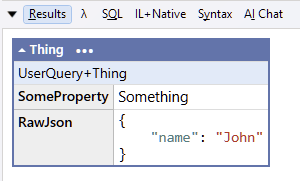
Could there be some kind of LINQPad class like ScrollCell, something like this:
void Main()
{
    var json = """
    {
        "name": "John"
    }
    """;

    new Thing()
    {
        SomeProperty = "Something",
        RawJson = new ScrollCell
        {
            VisibleLines = 3,
            Content = Util.SyntaxColorText(json.ToString(), SyntaxLanguageStyle.Json, autoFormat: true)
        }
    }.Dump();
}

public class Thing
{
    public required string SomeProperty { get; set; }
    public required ScrollCell RawJson { get; set; }
}


public class ScrollCell
{
    public int VisibleLines { get; set; }
    public object Content { get; set; }
}
Best Answer
-
The easiest way to do this is with a
DumpContainer:new DumpContainer (code) { Style = "max-height: 200px; overflow:auto" }.Dump();(
Util.WithStyleshould also work, although it doesn't right now due to a bug/limitation when wrapping block elements. I'll see whether this is easy to fix.)For a more fancy solution, you could create a custom Control:
using LINQPad.Controls;

class ScrollableControl : Control
{
    public string MaxHeight { get => Styles["max-height"]; set => Styles["max-height"] = value; }

    public ScrollableControl (Control child, string maxHeight) : base ("div", child)
    {
        Styles["overflow"] = "auto";
        MaxHeight = maxHeight;
    }

    public ScrollableControl (object content, string maxHeight)
        : this (new DumpContainer (content), maxHeight) { }

    public ScrollableControl WithBorder (string border = "solid 1pt #777")
    {
        Styles["border"] = border;
        return this;
    }

    public ScrollableControl WithPadding (string padding = "3pt")
    {
        Styles["padding"] = padding;
        return this;
    }
}
Note that you can ask AI to write such wrappers. The recent beta actually includes additional training for creating custom controls, so now it's pretty reliable. Press Ctrl+I and ask it, Write a LINQPad control that makes SyntaxColorText or another control scrollable.

Answers
-
That's great. Thanks very much Joe. I hadn't considered having a DumpContainer in a cell.
Will try out the beta as extra controls help has been on my wish list. -
I created a wrapper for this purpose, but I like Joe's approach to it deriving from Control. Might switch over to something similar. Hopefully gives you other ideas on how to construct custom controls.
public interface IFixedDumpContainer { Control Control { get; } DumpContainer Container { get; } } public static class UtilExtensions { extension(Util) { public static IFixedDumpContainer FixedDumpContainer(Action<Control>? configure = default) => new FixedDumpContainerImpl(null, configure); public static IFixedDumpContainer FixedDumpContainer(object initialContent, Action<Control>? configure = default) => new FixedDumpContainerImpl(initialContent, configure); } private class FixedDumpContainerImpl : IFixedDumpContainer { const string DefaultMaxHeight = "360px"; const string DefaultMinWidth = "50%"; public FixedDumpContainerImpl(object? initialContent, Action<Control>? configureControl) { var dc = Container = initialContent is not null ? new(initialContent) : new(); var control = Control = Container.ToControl(); control.Styles["display"] = "inline-block"; control.Styles["overflow"] = "auto"; configureControl?.Invoke(control); if (control.Styles.All(x => !x.Key.Contains("height", StringComparison.OrdinalIgnoreCase))) control.Styles["max-height"] = DefaultMaxHeight; if (control.Styles.All(x => !x.Key.Contains("width", StringComparison.OrdinalIgnoreCase))) control.Styles["min-width"] = DefaultMinWidth; } public Control Control { get; } public DumpContainer Container { get; } object ToDump() => new Control(Control); } } -
Hi Jeff,
Thanks very much for this. I'd just started on adapting Joe's approach but it interesting to see other appoaches too.
I ended up going down a slightly more 'text' specific route and came up with (with some ai help) this:
#load ".\ControlsEx"

void Main()
{
    var json = File.ReadAllText(UtilEx.Paths.Desktop("Sample.json"));

    new Thing()
    {
        SomeProperty = "Something",
        RawJson = new ScrollableTextControl(Util.SyntaxColorText(json.ToString(), SyntaxLanguageStyle.Json, autoFormat: true),
                                        visibleLines: 10)
    }.Dump();
}

public class Thing
{
    public required string SomeProperty { get; set; }
    public required ScrollableTextControl RawJson { get; set; }
}


public class ScrollableTextControl : Control
{
    class Attributes
    {
        internal const string Expanded = "data-expanded";
        internal const string ConstrainedHeight = "data-constrained-height";
    }

    private (string Top, string Right, string Bottom, string Left) _padding;


    private ScrollableTextControl(Control child, int visibleLines) : base("div")
    {
        VisualTree.Add(ExpandBtnControl = new Control("a", "Expand")
        {
            Styles =
            {
                ["grid-row"] = "1",
                ["grid-column"] = "2",
                ["background"] = "#DAEAFA",
                ["color"] = "black",
                ["padding"] = "0.5em 0.75em",
                ["margin"] = "0.25em 1.75em 0 0",
                ["border-radius"] = "0.25em",
                ["font-size"] = "0.9em",
                ["text-decoration"] = "none",
                ["opacity"] = "0.8",
                ["cursor"] = "pointer",
                ["z-index"] = "1",
                ["user-select"] = "none"
            },
            HtmlElement =
            {
                ["href"] = "#",
                ["title"] = "Expand to full height",
                ["onclick"] = $$"""
                    var p=this.parentElement;
                    var exp=p.getAttribute('{{Attributes.Expanded}}')==='true';
                    if(exp){
                        p.style.maxHeight=p.getAttribute('{{Attributes.ConstrainedHeight}}');
                        this.textContent='Expand';
                        this.title='Expand to full height';
                        p.setAttribute('{{Attributes.Expanded}}','false');
                    }
                    else{
                        p.style.maxHeight='none';
                        this.textContent='Collapse';
                        this.title='Collapse to constrained height';
                        p.setAttribute('{{Attributes.Expanded}}','true');
                    }
                    return false;
                    """
            }
        });

        VisualTree.Add(ContentWrapperControl = new Control("div", child)
        {
            Styles =
            {
                ["grid-row"] = "1 / span 2",
                ["grid-column"] = "1 / span 2",
                ["overflow"] = "auto",
                ["scrollbar-width"] = "auto",
                ["scrollbar-gutter"] = "stable",
                ["max-height"] = "inherit"
            }
        });


        Styles["display"] = "grid";
        Styles["grid-template-columns"] = "1fr auto";  // right col = button width only
        Styles["grid-template-rows"] = "auto 1fr";     // top row = button height only
        Styles["max-width"] = "60em";
        Padding = "0em 0em 0em 0em";
        HtmlElement[Attributes.Expanded] = "false";
        VisibleLines = visibleLines;
    }


    public ScrollableTextControl(string content, int visibleLines) : this(new DumpContainer(content), visibleLines)
    {
        TotalLineCount = content.Split(new[] { "\r\n", "\r", "\n" }, StringSplitOptions.None).Length;
    }

    public ScrollableTextControl(LINQPad.SyntaxColoredText content, int visibleLines) : this(new DumpContainer(content), visibleLines)
    {
        TotalLineCount = content.Text.Split(new[] { "\r\n", "\r", "\n" }, StringSplitOptions.None).Length;
    }


    public readonly Control ExpandBtnControl;
    public readonly Control ContentWrapperControl;


    public string Padding
    {
        get => Styles["padding"];
        set
        {
            _padding = ControlsEx.Css.ParsePaddingComponents(value);
            Styles["padding"] = value;
        }
    }


    private int _visibleLines;
    public int VisibleLines
    {
        get => _visibleLines;
        set
        {
            _visibleLines = value;
            UpdateLayout();
        }
    }


    private int _totalLineCount;
    public int TotalLineCount
    {
        get => _totalLineCount;
        private set
        {
            _totalLineCount = value;
            UpdateLayout();
        }
    }


    private void UpdateLayout()
    {
        if (_visibleLines == 0)
        {
            this.Visible = false;
        }
        else if (_visibleLines < 0 || _totalLineCount <= _visibleLines)
        {
            Styles["max-height"] = "none";
            ExpandBtnControl.Visible = false;
        }
        else
        {
            this.Visible = true;
            ExpandBtnControl.Visible = true;
            var constrained = $"calc(({_visibleLines} * 1lh) - {_padding.Bottom})";
            Styles["max-height"] = constrained;
            HtmlElement[Attributes.ConstrainedHeight] = constrained;
        }
    }
}
ControlsEx has this:
public static class ControlsEx
{
    public static class Css
    {
        public static (string top, string right, string bottom, string left) ParsePaddingComponents(string padding)
            => ParseBoxShorthand(padding);

        public static (string top, string right, string bottom, string left) ParseMarginComponents(string margin)
            => ParseBoxShorthand(margin);

        private static (string top, string right, string bottom, string left) ParseBoxShorthand(string value)
        {
            var parts = value.Trim().Split(' ', StringSplitOptions.RemoveEmptyEntries);
            return parts.Length switch
            {
                1 => (parts[0], parts[0], parts[0], parts[0]),
                2 => (parts[0], parts[1], parts[0], parts[1]),
                3 => (parts[0], parts[1], parts[2], parts[1]),
                4 => (parts[0], parts[1], parts[2], parts[3]),
                _ => throw new ArgumentException($"Invalid CSS shorthand value: '{value}'")
            };
        }
    }
}
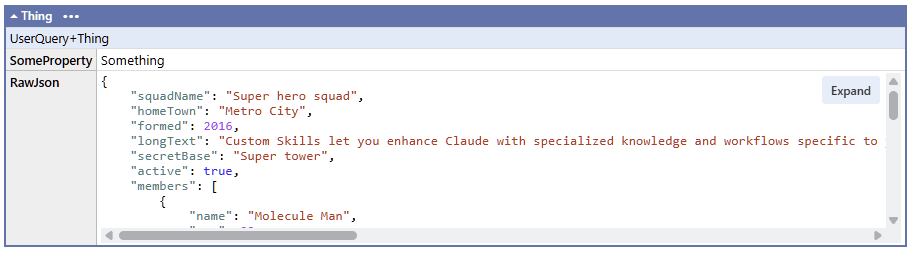
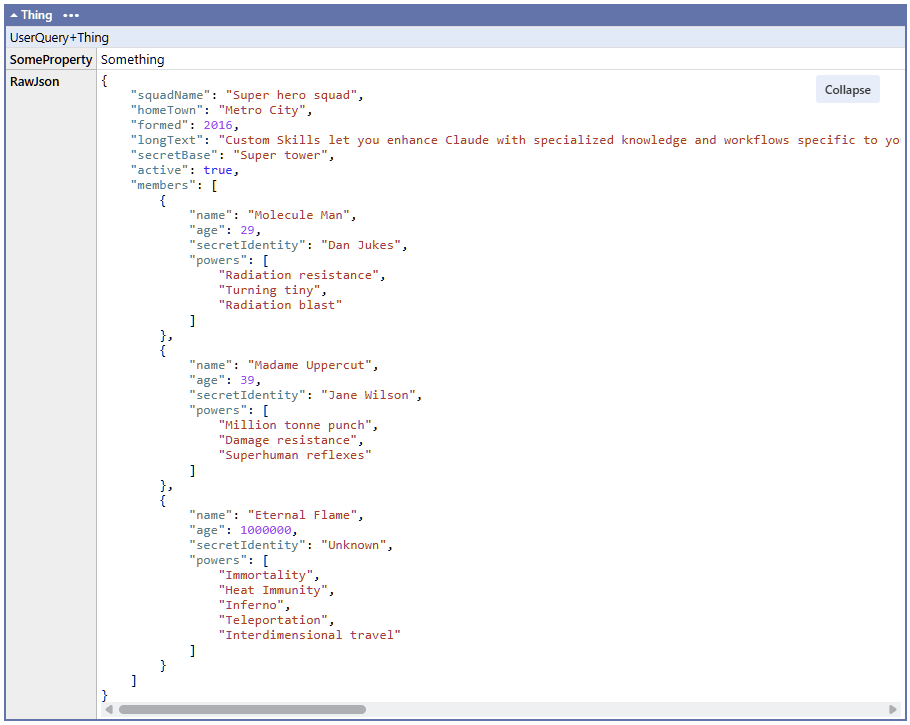
The output looks like this:
Anyway, thanks again to you both.
