Korean IME composition is not displayed while typing in the LINQPad 9 code editor

I’m experiencing an issue with Korean IME input in the LINQPad 9 code editor.
Environment
- Windows 11
- LINQPad 9 Free, x64
- Microsoft Korean IME
- LINQPad 9.10.19
- Also reproduced in LINQPad 9.11.5 Beta
Steps to reproduce
- Open LINQPad 9.
- Open a new C# query.
- Focus the code editor.
- Switch the Windows input method to Korean.
- Type a Korean word, for example
한글. - Observe the characters while typing.
When typing 한, the Korean IME goes through the following composition states:
ㅎ → 하 → 한
Actual behavior
The intermediate composition characters are not displayed in the code editor.
For example:
- Type
ㅎ→ nothing is displayed - Type
ㅏ→ nothing is displayed - Type
ㄴ→한suddenly appears
The input itself appears to be processed correctly, but the IME composition is not visually rendered until the composition is committed.
Expected behavior
The currently composing Korean characters should be displayed immediately, as they are in normal text input controls.
For example:
ㅎ → 하 → 한
should be visible while typing.
Additional observations
This does not happen throughout the entire system. It only occurs in certain applications.
I tested the following:
| Application / Input Area | Result |
|---|---|
| LINQPad 9 Code Editor | Affected |
| LINQPad 9 Ctrl+F search box | Works normally |
| Rider Code Editor | Works normally |
| Rider Claude window/input area | Affected |
| Warp | Affected |
| Other standard Windows applications | Works normally |
The fact that the Ctrl+F search box within LINQPad works normally is particularly interesting. This suggests that the Windows Korean IME itself is functioning correctly and that the issue may be specific to the code editor's IME/composition handling.
I also tested LINQPad 9.11.5 Beta, and the same issue is reproduced there.
I had not experienced this issue in LINQPad before. I recently opened LINQPad again after not using it for some time, and the issue is now present.
I searched the LINQPad forum for similar reports but couldn't find a report describing this specific behavior with Korean IME composition.
Since LINQPad 9 uses the Actipro SyntaxEditor for its code editor, I wonder if this could be related to IME composition handling or rendering in the editor component.
I can provide additional details or perform specific tests if that would help diagnose the issue.
Best Answer
-
I've just released the 9.11.6 beta with a brand-new custom Level 3 IME. Let me know whether this fixes your issues.

Answers
-
Perhaps you could reproduce the issue using On Screen Keyboard and post a screen capture?
-
sure. here it is.
- affected
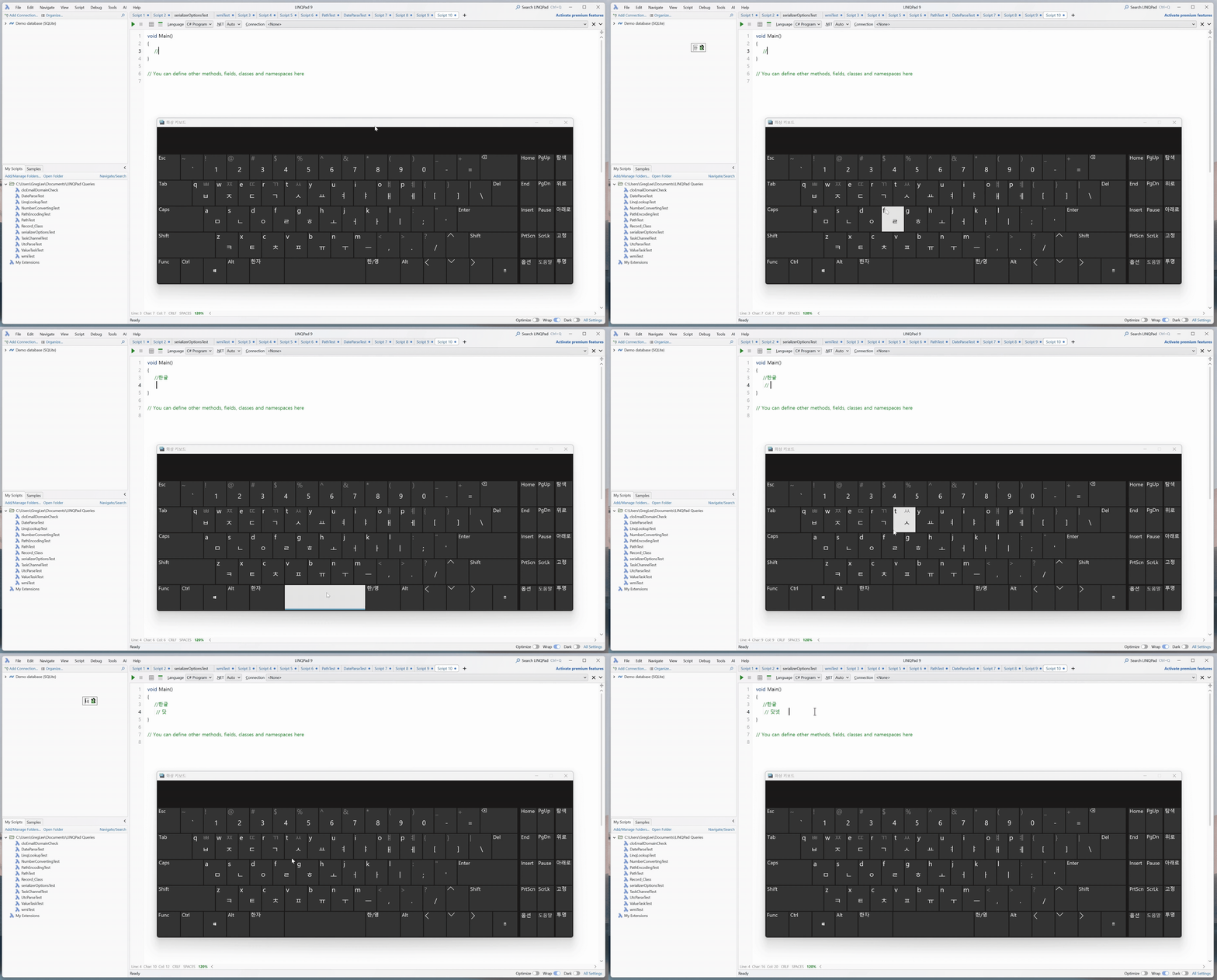
This video shows the issue occurring in the LINQPad 9 code editor.As I type Korean characters, the text is not displayed immediately. A "string completion" / completion popup window appears with each keystroke instead.
The Korean IME composition is not visually rendered in the editor while the character is being composed. The text only becomes visible once the Korean syllable is completed.
For example, when typing 한, the composition progresses through ㅎ → 하 → 한, but the intermediate characters are not displayed in the editor.
- works normally
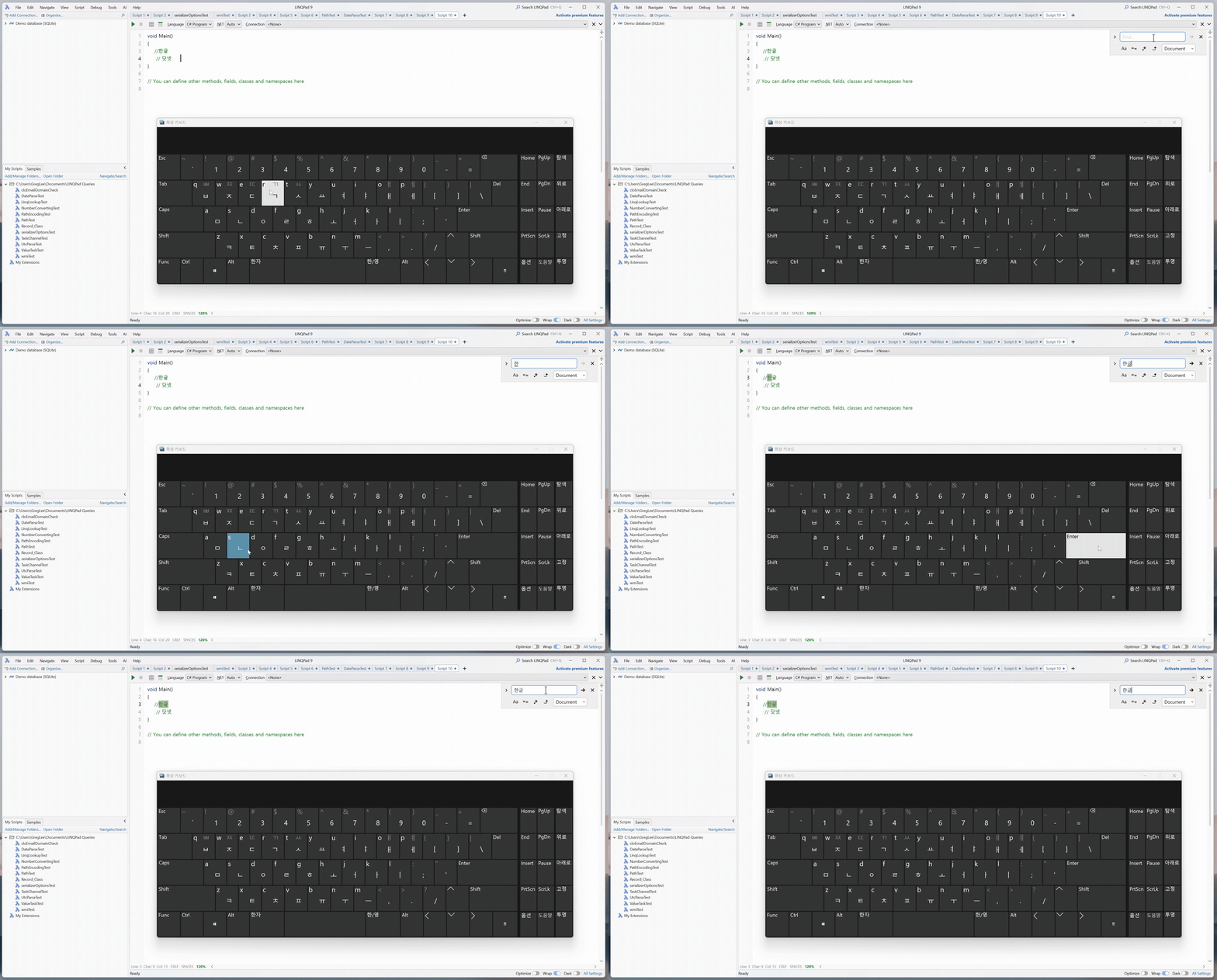
This video shows the same Korean IME input inside the LINQPad Ctrl+F search text box.In contrast to the code editor, the Korean characters are displayed immediately with each keystroke while the IME composition is in progress.
For example, ㅎ → 하 → 한 is displayed normally as each character is typed.
This demonstrates that Korean IME input itself is working correctly within LINQPad, while the issue appears to be specific to the code editor.
-
I've recreated the scenario and have identified a bug whereby the IME improperly scales, which I have fixed for the next build.
However, I can't reproduce the problem described, whereby a popup appears with an odd-looking arrow.
To help diagnose this can you press Windows+R and type
ms-settings:regionlanguage-korime. Do you have "Use previous version of Microsoft IME" on or off? And does flipping that toggle make any difference? -
Thank you
Thank you very much for looking into this and providing a fixed beta build. I can confirm that the issue is completely resolved in the new build.
I also tested this with several other machines used by my colleagues. The odd "string completion" popup that appeared on my machine could not be reproduced on those machines. However, they all exhibited the other part of the issue: Korean characters were not displayed immediately as they were being typed, unlike in the Ctrl+F search box. Instead, each character was displayed in a separate area, somewhat like superscript text, until the Korean syllable was fully composed.
So although the exact popup behavior was specific to my machine, the underlying IME composition rendering behavior was consistently present across the other machines as well.
In any case, the new beta build has completely fixed the problem. I really appreciate your help in investigating this and getting a fix out so quickly. Thank you!
