Markdown formatting

In markdown preview (.md) and when using Util.Markdown the space characters get stripped from the following sample:
00b3ade/                          # VS Code storage bucket for one workspace folder
├── workspace.json                # Identifies the real workspace this bucket belongs to
├── state.vscdb                   # VS Code workspace state database
├── state.vscdb.backup            # Backup copy of the workspace state database
├── chatSessions/                 # VS Code chat session timelines
│   ├── 8b23d5f3.jsonl            # One Copilot chat session log; filename is the session ID
│   ├── e0806f1c.jsonl            # Another chat session log
│   └── ...                       # Other saved chat sessions for this workspace
and render like this:
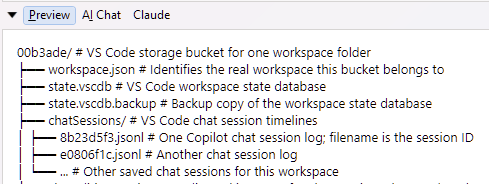
If you use Util.SyntaxColorText(mdStr, SyntaxLanguageStyle.Markdown).Dump(); then the spaces are retained and comments are aligned.
Is this an easy fix for the preview and Util.Markdown?
This is based on 9.11.8
Comments
-
This is correct markdown behavior. To preserve multiple spaces, you need to wrap that text block in a fence (three backticks).
Util.SyntaxColorText(mdStr, SyntaxLanguageStyle.Markdown)preserves spaces because it doesn't render markdown - it shows the original text with syntax-highlighting appropriate for markdown (suitable for an editor). -
Oh yes, of course. I don’t know why I didn't realise this. I managed to add triple quotes in this thread but not in the markdown file.
Apologies for the false flag.
