Could Util.Highlight have a foreground color overload?

I use Util.Highlight quite a bit. Would be great to be able to set the foreground color as well, particularly when the background is dark enough to need white text.
Could the htmlColor parameter be renamed and add an optional parameter, or overload, for foreground?
Highlight(object data, string backgroundHtmlColor, string foregroundHtmlColor = "currentColor")
I'm aware of Util.RawHtml but my ideal would be the additional parameter for Util.Highlight.
Answers
-
If I can add on top, can there be a "auto foreground color" that contrasts with selected background color ?
-
I can concur, Util.Highlight and Util.HighlightIf are really helpful - perhaps a color Enum based on the Excel color palette would be helpful for the less artistic among us? Slightly related: https://forum.linqpad.net/discussion/comment/9936/#Comment_9936 (Util.ToSpreadsheet / Util.HighlightIf combo)
-
I've fixed the automatic foreground color assignment in 9.12.2 such that it should now choose the right color for all backgrounds, in both light and dark themes.
Automatic brightness adjustment for cell backgrounds in data grid mode has also been improved - all highlight colors should now contrast with the foreground.
Let me know whether this addresses your concerns.
-
Oh that's helpful - I hadn't spotted the auto foreground adjustment before.
I think this does work in most cases, but there are still some places in the middle where, if I had control, I'd still override to white.
For example this code:
void Main()
{
    for (int l = 0; l <= 100; l += 10)
    {
        var row = new List<object>();
        for (int h = 0; h < 360; h += 36)
        {
            string color = $"hsl({h}, 100%, {l}%)";
            row.Add(Util.Highlight("Alert", color));
        }
        Util.HorizontalRun(true, row).Dump();
    }

    Util.Highlight("Alert", "#ff0000").Dump("Currently");

    Util.RawHtml("""
    <span style="background: #ff0000; color: #ffffff">Alert</span>
    """).Dump("Preferred");
}
...results in this output
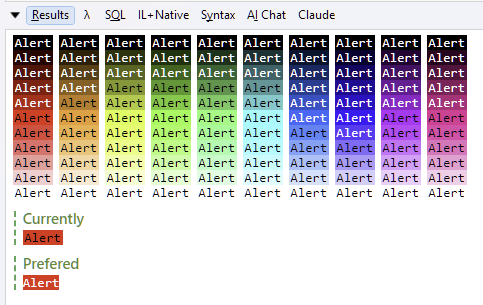
I suppose if there was and overload then I could just add the foreground in those edge cases.
This is not super important issue, after all
RawHtmlis available. ButUtil.Highlightis both nice and terse and reads nicely too. -
I'll tweak the thresholds.
-
Ok, thanks Joe.


