Highlight full version number in "What's new" page

For the beta channel in particular, the first thing I do after downloading an update is to look at the what's new page. It would be really handy if you could identify the changes in the latest release.
For example:
(numbers are not real - just for example where 9.12.3 is the latest release)
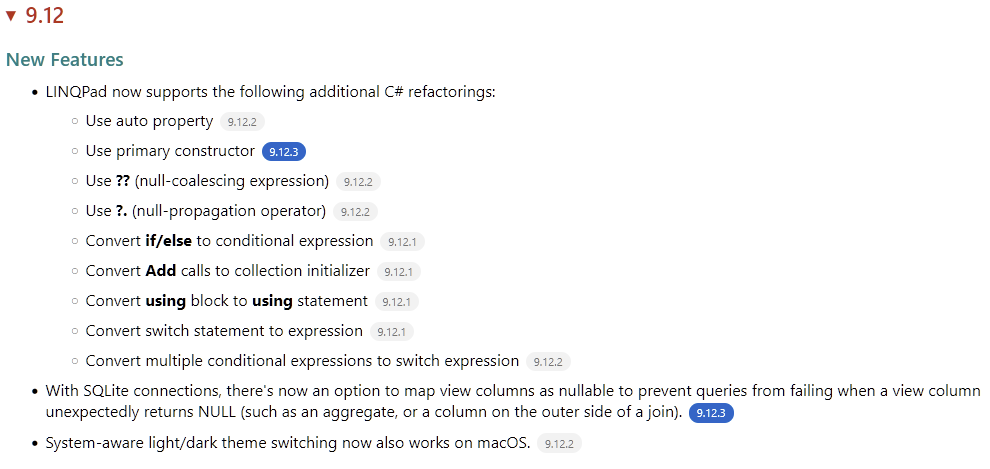
Not sure if you like that or if it would be a pain to add/remove.
If useful here's some css to be helpful.
<style type="text/css">
    :root {
        --background-color: white;
        --foreground-color: black;
        --background-color-kbd: #f3f3f3;
        --foreground-color-pre: #007;
        --foreground-color-summary: #BF2C19;
        --foreground-color-h3: #008080;
        --blue: rgb(0, 102, 204);
        --background-color-pill: #f2f2f2;
        --foreground-color-pill: #747474;
        --background-color-pill-latest: var(--blue);
        --foreground-color-pill-latest: white;
    }

    .version {
        display: inline-block;
        margin-left: 0.6em;
        padding: 0.1em 0.7em;
        font-size: 70%;
        line-height: 1.5;
        border-radius: 1em;
        background: var(--background-color-pill);
        color: var(--foreground-color-pill);
    }

    .version.latest {
        background: var(--background-color-pill-latest);
        color: var(--foreground-color-pill-latest);
    }
</style>
<ul>
    <li>
        LINQPad now supports the following additional C# refactorings:
        <ul>
            <li>Use auto property<span class="version">9.12.2</span></li>
            <li>Use primary constructor<span class="version latest">9.12.3</span></li>
            <li>Use <b>??</b> (null-coalescing expression)<span class="version">9.12.2</span></li>
            <li>Use <b>?.</b> (null-propagation operator)<span class="version">9.12.2</span></li>
            <li>Convert <b>if/else</b> to conditional expression<span class="version">9.12.1</span></li>
            <li>Convert <b>Add</b> calls to collection initializer<span class="version">9.12.1</span></li>
            <li>Convert <b>using</b> block to <b>using</b> statement<span class="version">9.12.1</span></li>
            <li>Convert switch statement to expression<span class="version">9.12.1</span></li>
            <li>Convert multiple conditional expressions to switch expression<span class="version">9.12.2</span></li>
        </ul>
    </li>
    <li>
        With SQLite connections, there's now an option to map view columns as nullable to prevent queries from failing when a view column unexpectedly returns NULL (such as an aggregate, or a column on the outer side of a join).<span class="version latest">9.12.3</span>
    </li>
    <li>System-aware light/dark theme switching now also works on macOS.<span class="version">9.12.2</span></li>
</ul>
Comments
-
That really only works if you never skip a version, otherwise the highlighting would be misleading.
Even though I use Linqpad every day, I've see several jumps in build number. I have also restart to install a new version which was downloaded automatically only to be prompted to download yet another new version.
-
That's a good point. I'm specifically thinking about the beta builds here. I guess when you're downloading an update you have the potential to know what your previous build was and on that basis, you know which version would be considered to be 'new', so maybe the class could be
newinstead oflatest.I think Visual Studio maintains details of the previous installed build in its state.json file. I'm not sure if this is for rollback or something else but it's useful information in this case.
I suppose if that's overly complicated for something that's not used everyday then just the gray version pill would still be helpful.
