Is there a simple way to hide object header display from Dump()?

I'm using Dump() to build a simple UI and would like it not to display the headers with the object information. What is the simplest way to do this?
This simple example
List<dynamic> list = new()
{
    new { A = "1", B = "xxx", Info = new { C = 1, D = "xxx", E = "xxx" } },
    new { A = "2", B = "xxx", Info = new { C = 2, D = "xxx", E = "xxx" } }
};

list.Dump();
displays as

but I would like it to display as

Is there a simple way to achieve that?
Comments
-
And what will happen if user presses
Alt+2? How tables which have no headers will be collapsed?
-
If you are happy enough to remove all headers from everything that is dumped in your query, then you can call
Util.RawHtml("<style>.typeheader {display: none}</style>").Dump();Note this even affects objects that are dumped before this line is called.
Alt+2 behaves as you would expect, but Alt-1 may hide everything.
If you only want to do this on one object, but are happy enough to remove headers on nested objects, then you could try
Util.RawHtml("<style>.InvisibleTypeheader {display: none}</style>").Dump(); Util.RawHtml(Util.ToHtmlString(true, list).Replace("<td class=\"typeheader\"", "<td class=\"InvisibleTypeheader\"")).Dump(); -
It works perfectly for my needs and using the second method I find that passing
enableExtensions:falsetoToHtmlString()disables Alt+1 and Alt+2 so I needn't worry about accidentally hitting those keystrokes. -
Thanks @sgmoore for this approach.
I added the following to remove thead altogether for nested tables apart from tables with no summary (List) where column headers are still needed:
Util.RawHtml("""
    <style>
        table table tr:has(> td.typeheader) {
            display: none;
        }
        table table thead:not(:has(th)) tr:has(> td.summary) {
            display: none;
        }
    </style>
    """).Dump();
(not claiming css as my own...ai's very helpful)
-
@JohnGoldsmith said:
(...ai's very helpful)
Indeed. Somewhere over the last year or two I have changed my mind about AI. I went from struggling to get anything useful from it to now being amazed and struggling to understand some of the things it comes up.
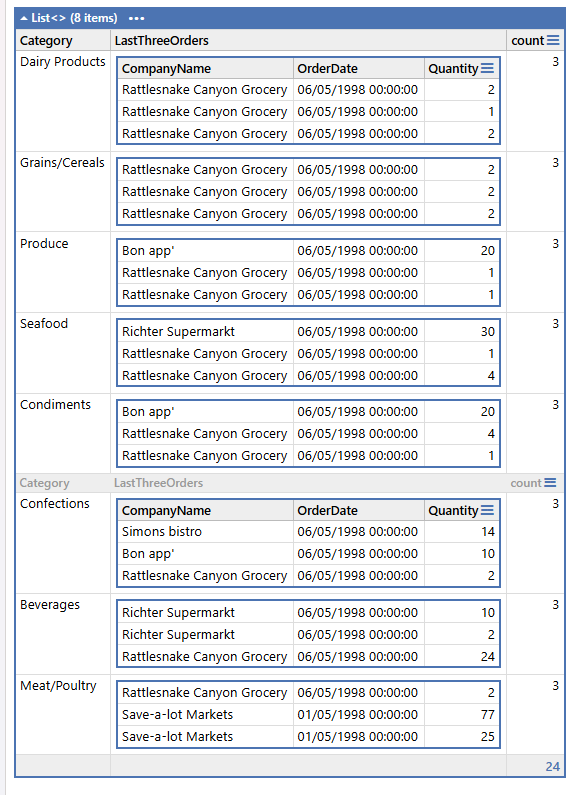
Obviously yours is a better approach than mine, so it inspired me to ask AI if it could go further and hide most of the repeated column names headings.
Then I asked it to see it could make all the nested table columns the same width and to hide the column totals.The script it produced is at https://share.linqpad.net/7lu8q2mq.linq (just don't ask me to explain it!)
This is a screenshot of result with a demo using the TestWind database -
-
Very nice. I can see these as a set of named profiles that could be applied from Util.


