accept autocomplete key not working as expected

Title
Rather than selecting the chosen item, it just adds spaces to the next indent. The tab key is permanently selected in settings, and enter key is the only other selection. Really distracting when this occurs.
Looks like this happens when you have the full starting text of the selection. If you typed out from the middle, it will do this.
e.g.,
If I had typed out app.UseMid for UseMiddleware, it works. If I had typed out app.mid, it does not. I would have expected this to work.
Looks like for a single unambiguous selection, it doesn't auto select it. I have to arrow to the selection for it to work.
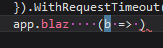
It's a little inconsistent too. For MapBlazorHub, starting with app.blaz (with one option), it indents and inserts the initial argument body.
Comments
-
I'm having trouble following this... can you provide a step-by-step repro?
-
Consider these methods:
void UseAnotherThing() {}
void UseAnotherThingElse() {}
void UseSomething() {}
If I start typing
Useand hit the autocomplete key (tab), it would insertUseAnotherThingas that is the first item in the list.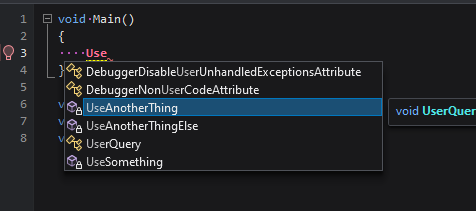
If I type
Someand hit tab, it would merely insert spaces for the indent, and not select the only option available. I would have expected it to insert.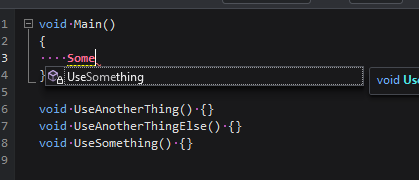
In other words, it seems like an item is selected only if it is a full match, but not a match in the middle of the term.
And the odd corner case is if an argument is a delegate, the argument is started, but the name of the method is not inserted (just the spaces).
void UseThat(Action<object> act) {}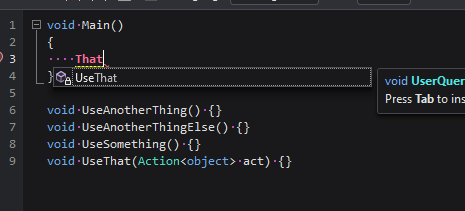
Typing
thatand hitting tab, does this: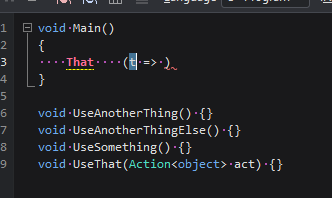
-
I see: you're saying that the tab key should be privileged in being able to confirm selections, whether or not the selection is virtual. Makes sense.
This is an easy fix - it should hopefully make it into today's build.
-
Perfect! Thanks Joe.
-
good question

