Claude Code - now supported

The latest LINQPad beta includes an integrated Claude Code terminal. To use, just install the Claude Code CLI and start LINQPad, or use LINQPad's installation assistant in Settings | Claude Code.
Because LINQPad hosts the real Claude Code CLI in a terminal emulator, it works with the high-value Pro and Max plans, which will offer the cheapest access to Opus come June 1.
LINQPad configures Claude with 20+ optimized tools to interact with the editor and LINQPad script; this is in addition to Claude's own tools which include web search.
Let me know how you get on!
Comments
-
Working Great!
-
Unclear if this is a LINQPad bug or the CC integration bug.
CC is using a path where another portable LINQPad was located. I have more portable installs across several drives, but the path CC is using is very old and not a recent installation.
-
What do you mean by "CC is using a path"? CC should interact with your script via the editor.
Or are you referring to CC settings and customizations?
-
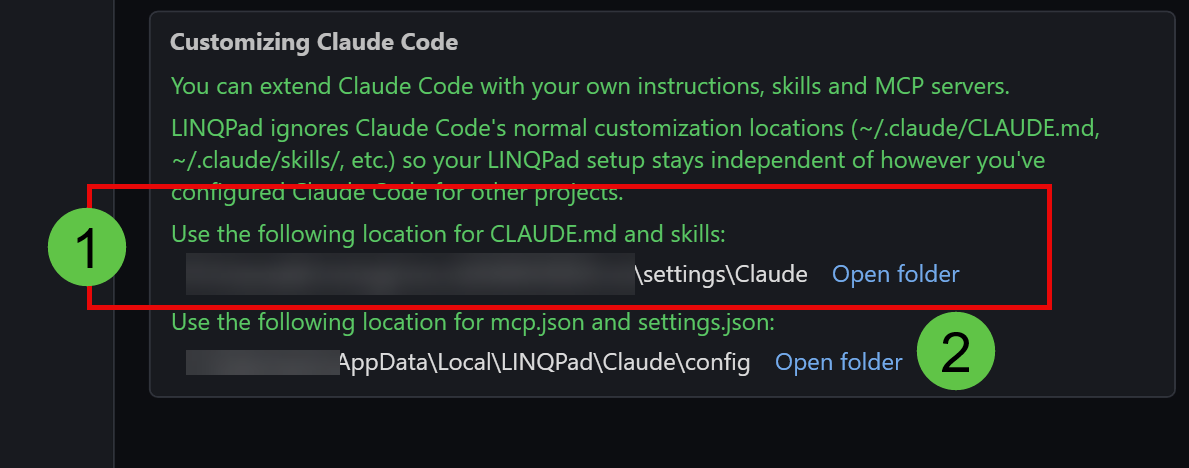
I have several xcopied portable versions and program files installs.
1# is a random portable install on a drive I haven't used in months. The path is pointing to a install that is not in the same portable installation.
2# I would prefer that this is stored with the portable install not a global configuration location and or env var.I develop MCPs and use the Agent SDKs in my work so having better isolation is preferred.
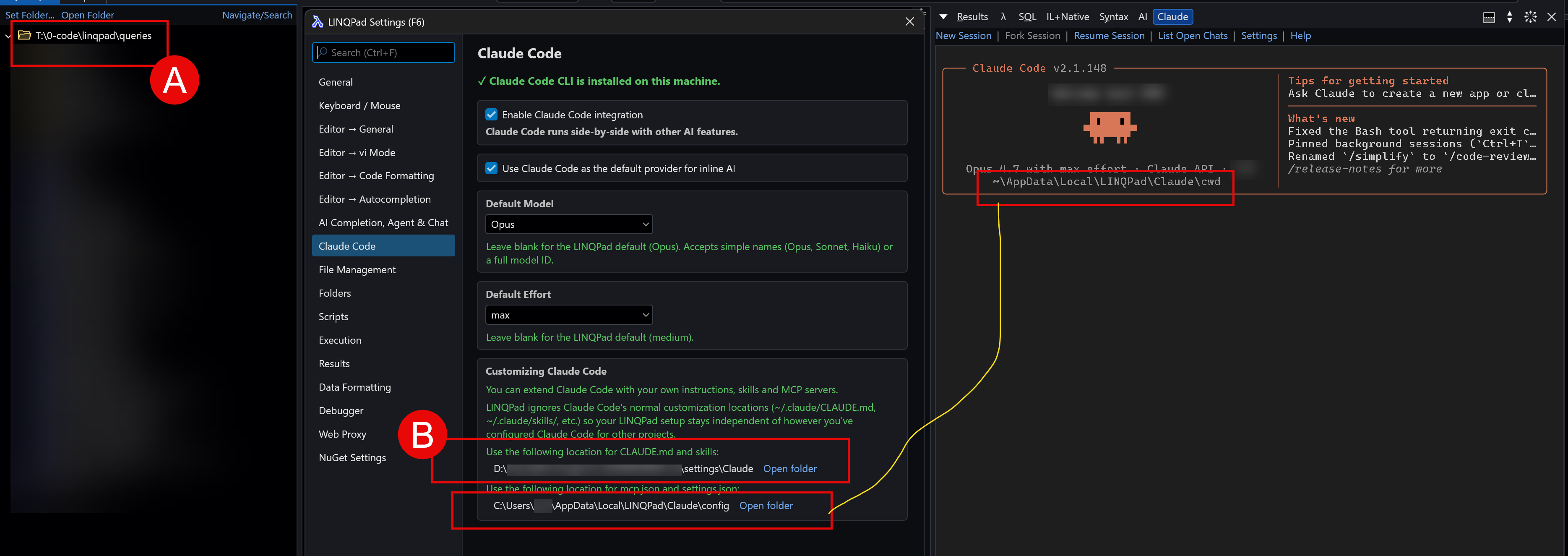
A# will change under each portable install.
B# is another but very infrequent portable install, puzzled by its use here.I would prefer B# location match the portable install and for program file installation it should use a location specified in the LINQPad Settings. This is how other settings
work and recent updates are making portable installs actually portable with improved isolation.I found why the settings location is different. I think there is a bug in how or what triggers the correct location to use:
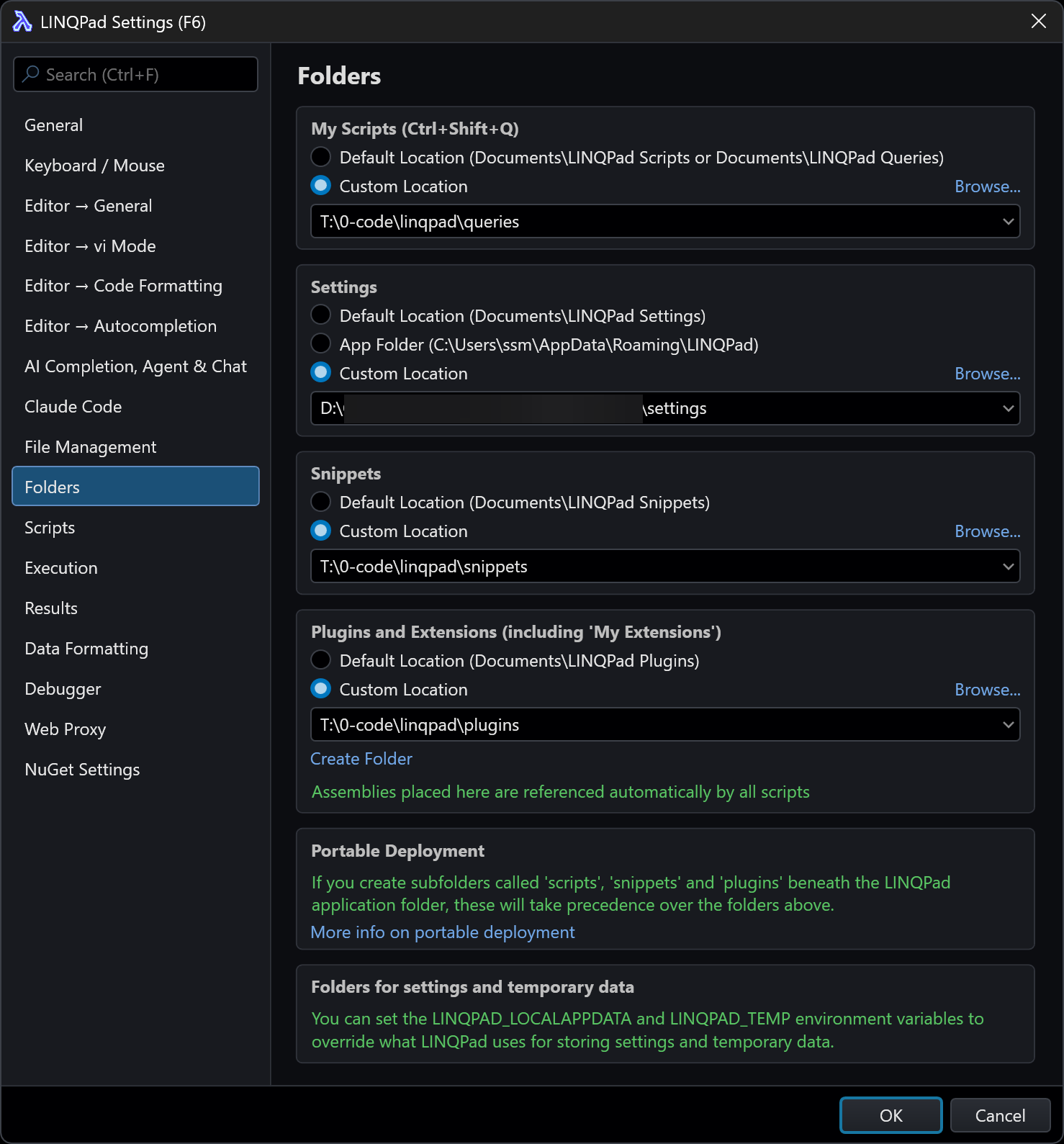
In another portable install, LINQPad is using the correct portable locations, except Settings for some reason it is using the same path shown above. Every installation is using that path even with a Settings folder. They use a template with the same xcopy deploy artifacts. They all have a Settings folder, and I never change these values in portable installs.
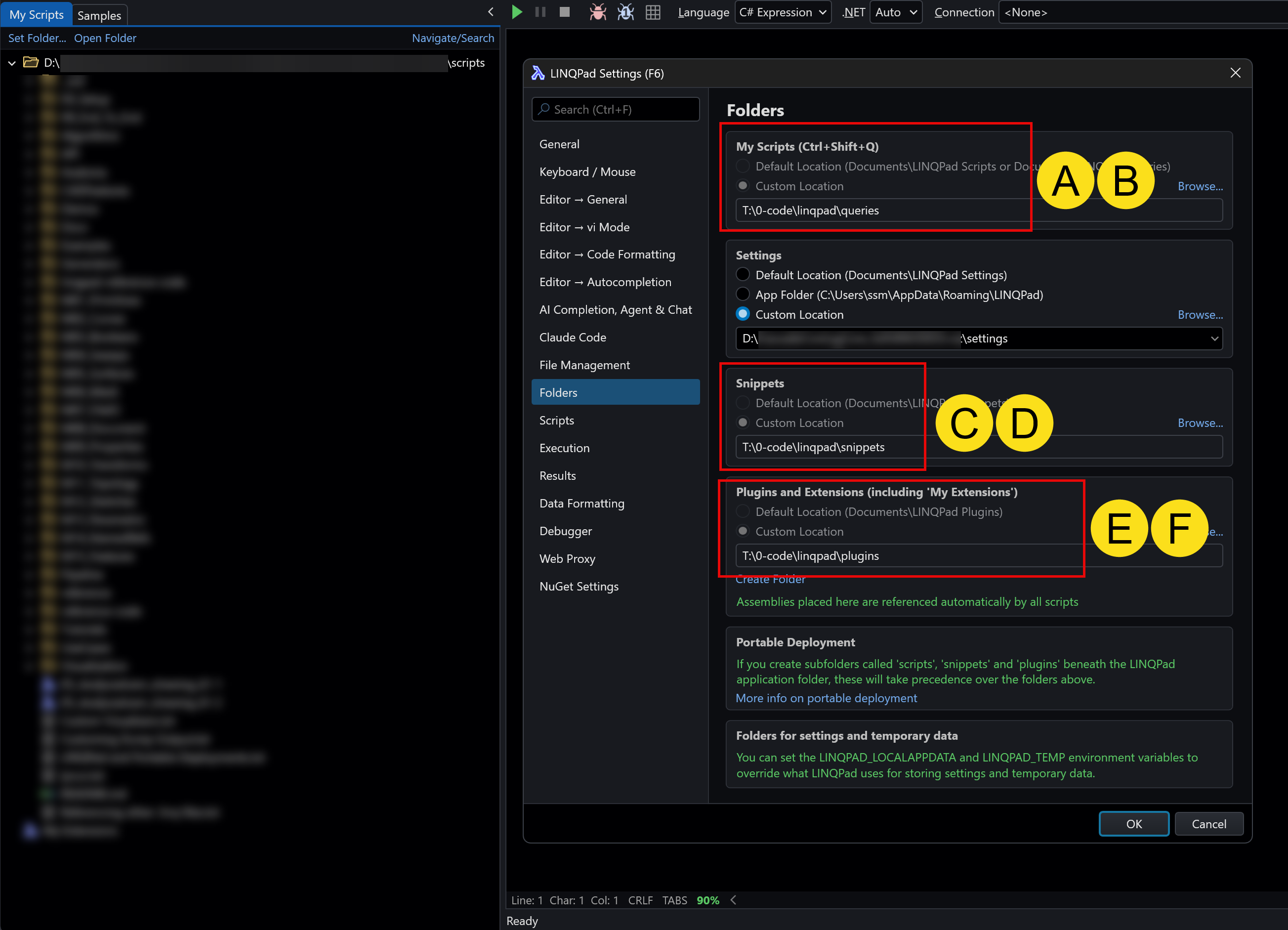
AB, CD and EF are greyed out for portable installations but Program Files\LINQPad9\LINQPad9-x64.exe is not and is fully editable.
Why is Settings different? There is no reason to ever manually change the Settings location in a portable installation.Clean typical portable template I update and reuse. Settings is clearly not picking up the portable folder. It did work I tested it and confirmed all paths were set to the correct subfolder before updating my existing portable installations.
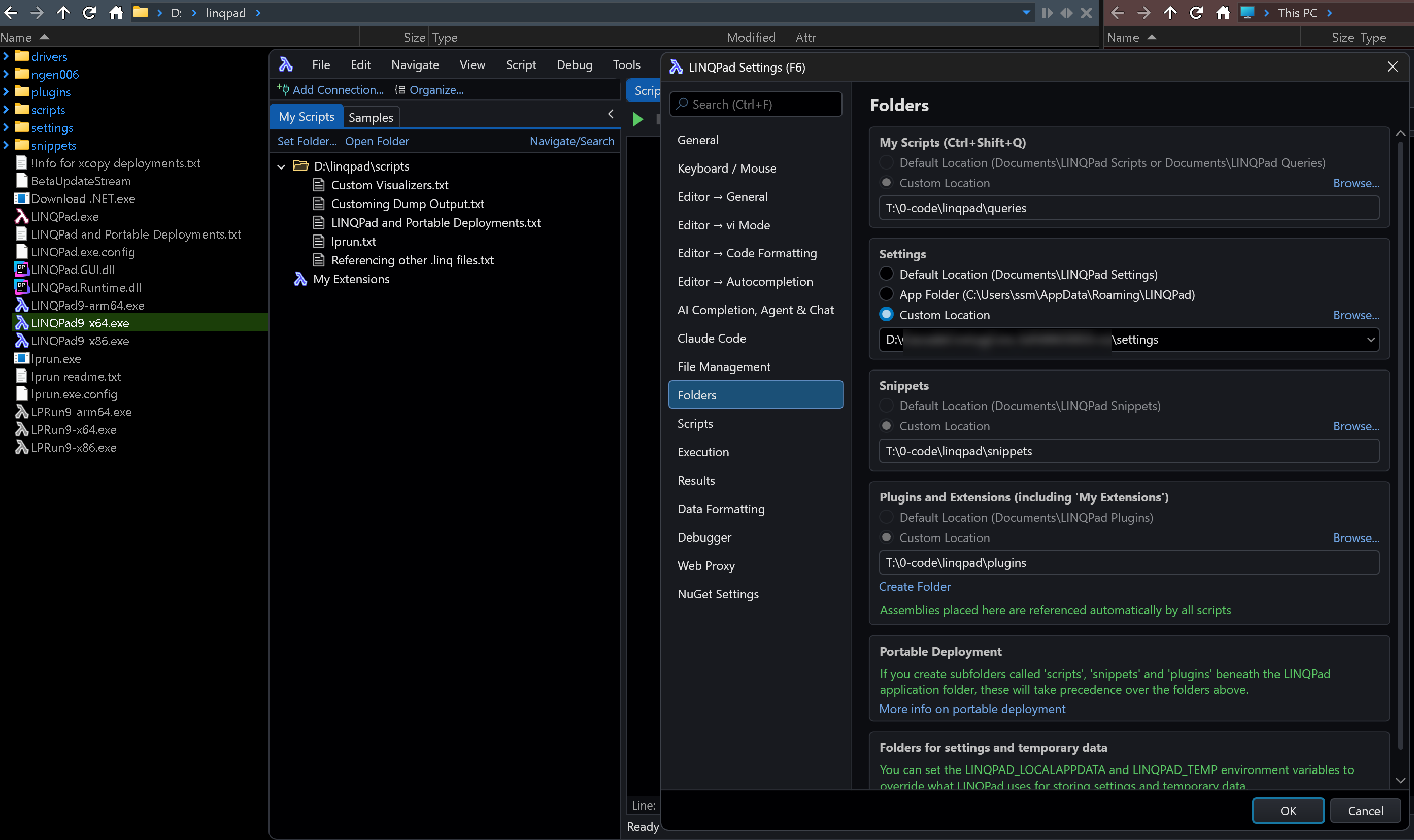
Hope this helps.
-
https://www.linqpad.net/PortableDeployment.aspx
claude/ -- Customizations for Claude Code (CLAUDE.md, skills)
settings/ is missingI reset the path and I confirmed it is not portable. All LINQPad (including non-beta) programs point to the same custom location for Settings.
Because it is missing from Portable Deployment, is this the intended behavior? I assume it is, the claude folder is working.
-
I've improved the portable deployment features and documentation in 9.9.4:
https://www.linqpad.net/PortableDeployment.aspxNote that the settings folder will continue to be customizable in portable deployments unless you create a settings subfolder. LINQPad still lets you create xcopy-deployments that use global settings if that's what you want.
With regard Claude, the Settings dialog now mentions the claude subfolder, and you can also now place mcp.json and settings.json in that folder, too.
-
I’m asking how to set it up if I want to use a Docker sandboxes (sbx) with Claude terminal in LINQPad. I’d like to have an isolated sandbox environment for Claude
-
I don't believe this is viable. To make this work, you'd need an isolated environment not for Claude itself but for its tools and for LINQPad script execution, compilation and NuGet package restoration. There would likely be numerous other attack vectors to address: LINQPad would essentially need to become a hostile content renderer.
Your only real option is to run the whole thing in a VM. It's all been tested with Windows Sandbox, and the virtualization / RDP issues have been ironed out.
-
Note that LINQPad blocks Claude's script execution tools; the only way it can run scripts is via LINQPad's tools (to run LINQPad scripts) which are permission gated with a syntax-highlighted preview. File I/O is also permission-gated through LINQPad.
-
If I open Claude code and close the script (or close Linqpad itself), Linqpad hangs and goes into "Not Responding" mode.
If I open Claude code and then /quit, then I can close the script and Linqpad fine.When it is hung up, the claude.exe process is no longer running, and CPU for LP is virtually zero and Process Monitor does not show any activity from Linqpad.
I didn't see anything else usual in process monitor (although I did see claude call tasklist with a process id for LP, but that process is now longer running)
My setup is
Windows 10
LinqPad version is currently 9.9.8 (although the same issue has occur since 9.9.1).
Claude version is currently 2.1.170 (but this has changed several times recently) and claude is using an openrouter account rather than direct with AnthropicIs there anything else I can do to diagnose this?
-
Looks like 9.9.9 resolves the issue with Linqpad hanging after closing a script that open the Claude code window.
Thanks.
-
Terrific - I was unable to reproduce this, so the fix was a punt. The solution actually came from Fable in the brief window that it was alive - an obscure issue related to Windows 10.


