Why do json dump looks cut off

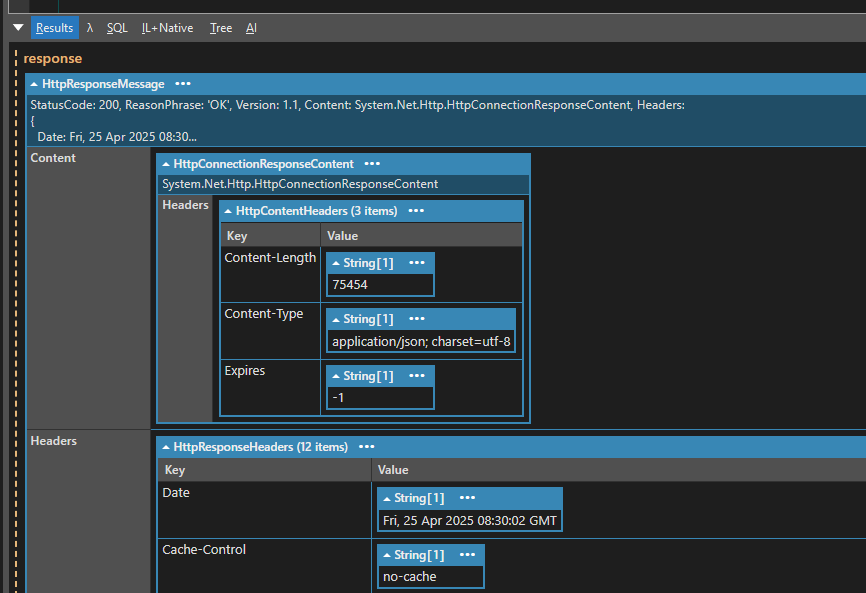
Why do json dump looks cut off and where is my json response

Comments
-
You are dumping out the WebResponse which includes details of the content but not the actual content itself and you still need to read it using something like
using (var reader = new StreamReader(response.Content.ReadAsStream()))
{
    string json = reader.ReadToEnd();
    System.Text.Json.JsonDocument.Parse(json).Dump();
}
But it is more easier to use
GetStringAsync(url);which does this for you - for exampleusing (var client = new System.Net.Http.HttpClient()) { var url = "https://googlechromelabs.github.io/chrome-for-testing/last-known-good-versions-with-downloads.json"; var json = await client.GetStringAsync(url); System.Text.Json.JsonDocument.Parse(json).Dump(); } -
thanks, that will output json, can i output the json as a Dump richtext format?
-
I'm not sure what you mean by a "Dump richtext format" ?
If you want to be able to expand or collapse sections of the json, then, AFAIK you can't do that in the rich text output panel, but can if you output to a grid/panel, e.g.
System.Text.Json.JsonDocument.Parse(json).Dump(true); -
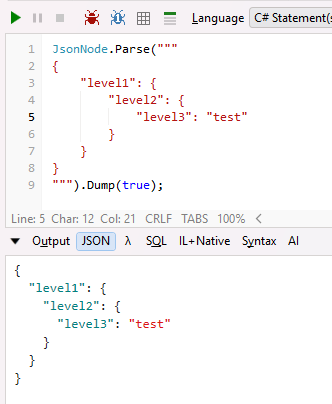
Hi, is the grid collapse still working, it looks like not:
KR
-
May I insist or should I create e new thread ?
KR -
I presume you're asking about outlining/folding? If so, this is now fixed in 9.9.2.
-
This is exactly what I was talking about, thanks for the fix
-
I didn't report the issue below as I thought it was a duplicate of this issue and would be fixed at the same time, but looks like I was wrong.
string csharp = "class Program\r\n{\r\npublic string Message = \"Hello\";\r\n}";
Util.SyntaxColorText(csharp, SyntaxLanguageStyle.CSharp, autoFormat: true).DumpToNewPanel("Simple");
That is so small it does not need outlining, but it would help with the following
LINQPad.Extensions.Decompile(typeof(LINQPad.Util)).DumpToNewPanel("LINQPad.Util"); -
This will require writing a new C# outliner to avoid creating a dependency on the Roslyn stack, but that's actually not too difficult nowadays with AI. I've added this to the latest build; the new outliner also works with JavaScript.
-
Works great.
Thanks


